![Iconmark - Blue.png]](https://learn.onboard.io/hs-fs/hubfs/Iconmark%20-%20Blue.png?width=40&height=40&name=Iconmark%20-%20Blue.png)
Click into your chatbot and navigate to the 'widget configuration' tab.
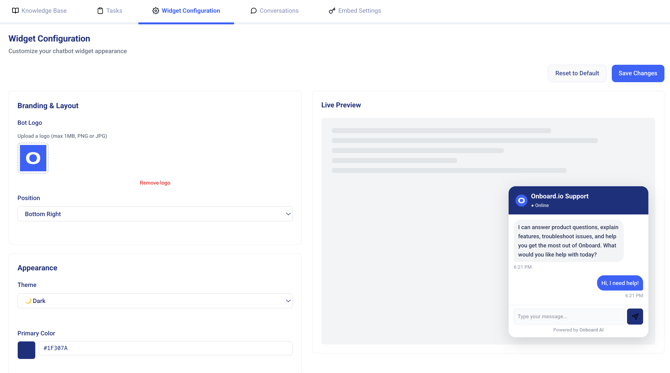
1. Open your bot's detail page and click the Widget Configuration tab.
2. A settings form appears on the left, with a live preview on the right — changes update instantly so you can see exactly what visitors will see.
Appearance
- Logo: upload a PNG or JPG (under 1 MB) to show your brand in the chat header.
- Position: Bottom Right or Bottom Left.
- Theme: Light or Dark, to match your site.
Colors
Every color is set with a color picker, and updates live in the preview:
- Primary Color (buttons and links)
- Header Text Color
- Background Color
- Bot Message Background / Text
- User Message Background / Text
Content & behavior
- Header Text: the title shown at the top of the chat window (e.g., "How can we help?").
- Welcome Message: the first message visitors see when they open the chat.
- Ask for Email: turn on to optionally collect a visitor's email address during the conversation.
- Show "Powered by Onboard AI" badge: toggle the attribution badge on or off.
Save or reset
Click 'Save Changes' to publish your settings to the live widget. If you want to start over, click 'Reset to Default'.
Deploying to your site
Once your knowledge base is loaded and your widget is styled, the bot is ready to go live:
- General Bots are embedded across your entire site automatically.
- Project Bots appear only on the domains and URLs you specified when you set them up.
- The Behavior Mode you chose (Button Only, Auto Show, or Hidden) controls how visitors first encounter it.
If you need a custom embed code for a specific platform, contact your Onboard support team.
---
Related: Setting Up Your First Bot · Reviewing Conversations & Bot Performance