![Iconmark - Blue.png]](https://learn.onboard.io/hs-fs/hubfs/Iconmark%20-%20Blue.png?width=40&height=40&name=Iconmark%20-%20Blue.png)
At Onboard.io we have dynamic due date dependencies at the task level, to make this process customizable and tailored to your project needs. While editing or creating a global task you can enable a default due date, and choose the dynamic due date dependency that best fits your needs. (See below options)
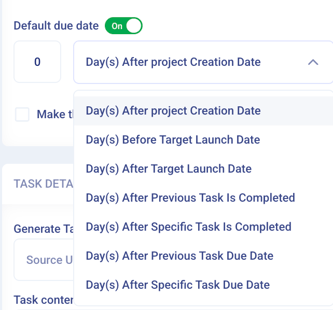
By utilizing dynamic due dates that are dependent on the project creation or launch date, previous task completion or due date; you can keep your project's task due dates fresh and accurate.
Of Note:
- You can set up your global tasks so that each task's due date is based on the previous or a specific task (setting up a due date based on the completion of the previous task is the most common use case)
- Onboard has circular dependency tracking so that you can't add an invalid dependency (ex: 2 tasks can't depend on each other)
- When a due date is changed in a project with these settings, we send one email notification to cover the due date changes for any assignees
- Sample use case: the first date date can be set to 1 day after project creation, and the following tasks can be all dependent on the previous task so that they all have due dates set and automatically refresh when a task at the top of the chain is updated.
Check out this video to see how/where to set up your due date dependencies within Onboard.io.