![Iconmark - Blue.png]](https://learn.onboard.io/hs-fs/hubfs/Iconmark%20-%20Blue.png?width=40&height=40&name=Iconmark%20-%20Blue.png)
If you have access to the onboard.io management portal and would like to see what the customer portal looks like for a specific project, first navigate to the Projects page. From there find the project you'd like to see and click the 3 dots menu on the right hand side of the row. From the dropdown, select 'Go to Customer Portal'. A new tab will open which will show you the customer portal view (while logged in as your existing account/profile); where you can see the project as your customer would see it.
Note that within this view you can still work on the project i.e. marking tasks complete, commenting on discussions, update due dates, assign tasks to someone on the project, etc.
As an alternative to the above, you can also check out the customer experience by inviting yourself to a project using a personal, alternate or unique email address. As an onboard.io management portal user, you can navigate to your project and click the '+Invite' button in the top right hand corner (or select 'manage people' from the 3 dots menu).
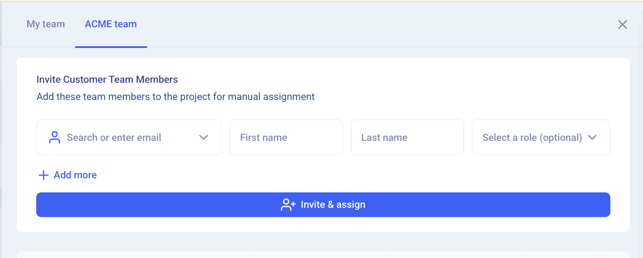
From this popup there are 2 tabs, one to manage your team and one to manage the customer's team. Toggle over to your customer's team tab, and enter your personal/alternate email address, enter your name and select a role. Click the '+Invite & Assign' button, and you will receive an email invitation with a magic link to the customer portal. This is the exact experience that your customer will have, an email invitation with a one click magic link to the customer portal. (No logins, passwords, or URL's to memorize.)
**Important note, you should log out of Onboard.io prior to clicking the email link OR ensure that you access the customer portal via a fresh browser; in order to avoid account conflict issues.